반응형
- Tweepy 깃허브: https://github.com/tweepy/tweepy/
- Tweepy 문서: https://docs.tweepy.org/en/stable/
⛳️ 본 게시물의 목표
- Tweepy를 이용하여 특정 키워드에 대한 X의 게시물의 내용을 Python을 통해 불러오기!
🦜 1. Tweepy란?
- Tweepy는 Python에서 Twitter(X) API를 쉽게 사용할 수 있도록 도와주는 오픈소스 라이브러리입니다.
- Twitter API와의 복잡한 통신 과정을 간결화해서, 간단한 코드만으로 트윗을 검색하고 작성할 수 있습니다.
- Tweepy의 주요 특징들은 다음과 같습니다.
- 간편한 인증 처리
- API Key, Access Token, Bearer Token 등으로 OAuth 인증을 손쉽게 구현 가능
- 풍부한 기능 지원
- 트윗 검색, 작성, 리트윗, 좋아요, 팔로우, DM 등 다양한 트위터 기능 제공
- 실시간 트윗 수신 가능
- Streaming API를 통해 특정 키워드나 계정에 대한 실시간 트윗 감지가 가능
- API v1.1 및 v2 모두 지원
- v1.1의 세밀한 제어와 v2의 현대적인 검색 및 필터링 기능 모두 사용 가능
- 간편한 인증 처리
- Tweepy를 사용하면 아래와 같은 작업들을 수행할 수 있습니다!
- 트위터 봇 제작
- 트렌드 분석 및 키워드 기반 수집
- 사용자 반응 분석, 감정 분석 등 데이터 마이닝
- 실시간 이벤트 모니터링
- 하지만 Tweepy 자체는 무료이지만, Twitter API는 요금제 및 권한에 따라 제한이 있습니다.
⚙️ 2. Tweepy 사전 설정 및 설치
2-1. X 개발자 계정 등록
- 먼저 X의 개발자 등록을 위해 일단 아래 링크에 접속 후 X 계정으로 로그인을 합니다.
- 아래와 같은 화면이 나오는데 일단 가장 아래의 “Sign up for Free Account”를 클릭하여 무료 사용자로 가입을 해보겠습니다.

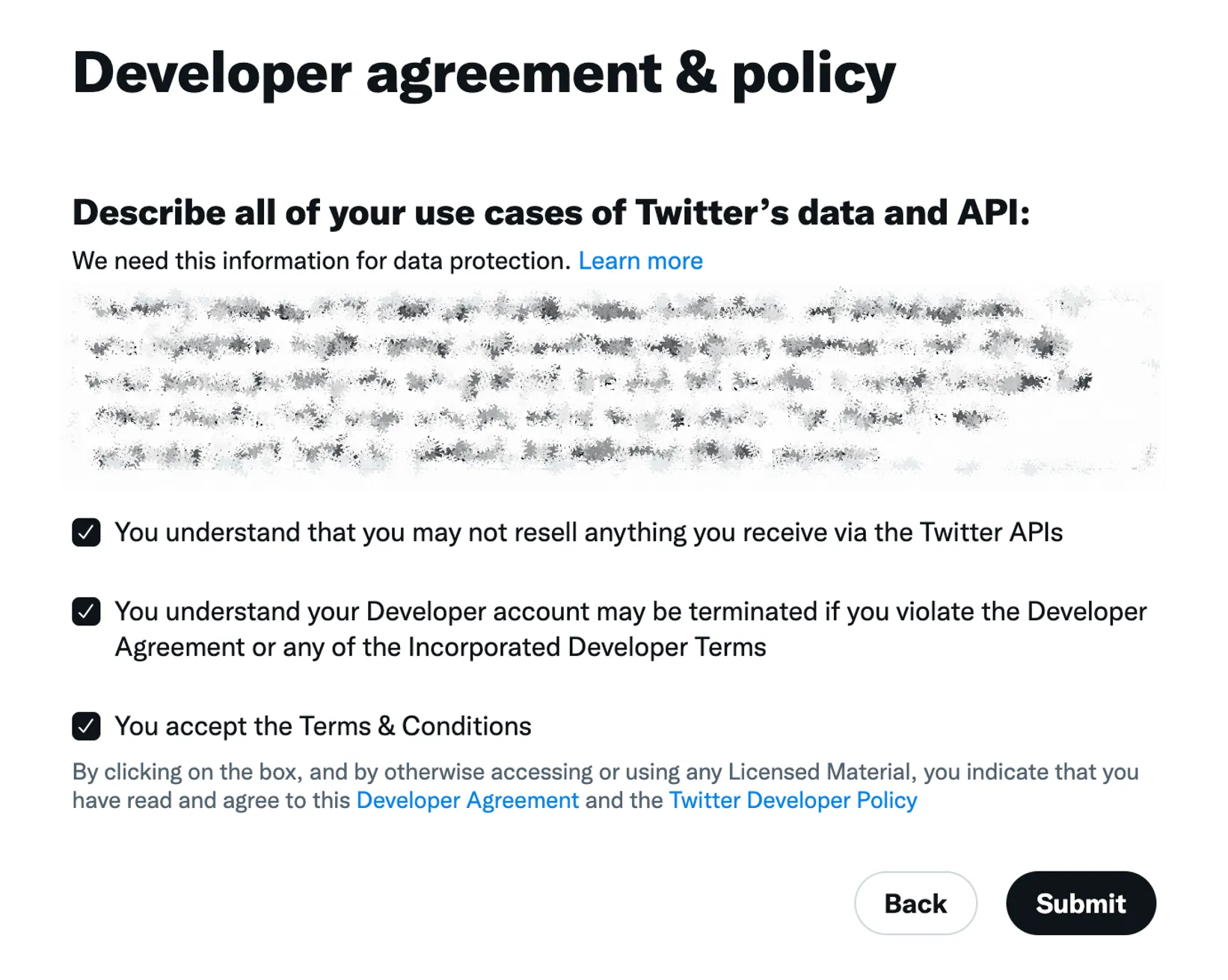
- 다음으로는 아래와 같이 트위터 데이터와 API를 사용하려는 목적과 사용 예시들에 대해 설명하고 약관들에 대해 동의한 이후 Submit을 클릭합니다.
2-2. API 요청을 위한 키 생성
- 그리고 처음 보이는 Dashboard 화면에서 아래 표시한 열쇠 버튼을 클릭해서 필요한 키들을 생성해보겠습니다.

- 여기서 Bearer Token의 Generate를 클릭하여 키를 생성하고 저장합니다.

2-3. tweepy 설치
- 다음으로 터미널에서 아래의 명령어를 입력해서 파이썬에 tweepy를 설치합니다.
pip install tweepy
📝 3. Tweepy를 이용한 게시물 검색 코드
3-1. 검색어로 게시물 검색하기
- 아래는 간단하게 Tweepy를 사용하여 입력한 키워드와 관련된 게시물의 텍스트를 불러오는 코드입니다. <Bearer Token>이라고 입력한 곳에 2-2의 과정을 통해 얻은 Bearer Token을 입력해주세요!
import tweepy

# API v2 인증 (Bearer Token 필요)
bearer_token = "<Bearer Token>"

client = tweepy.Client(bearer_token=bearer_token)

# 최근 7일 이내 트윗 검색 (최대 결과 10개)
query = "AI"
tweets = client.search_recent_tweets(query=query, max_results=10)

for tweet in tweets.data:
    print('========================')
    print(tweet.text)
- 코드는 보시다시피 매우 간단한데요! 대략적으로 아래와 같은 과정으로 진행됩니다.
- tweepy.Client에 Bearer 토큰을 입력
- client의 search_recent_tweets 함수에 검색할 키워드 (query)와 최대로 검색할 게시물의 수 (max_results)를 입력
- 결과로 받은 data의 text를 출력
- 제가 “AI”라는 키워드를 입력하여 얻은 결과는 다음과 같습니다! 생각보다 제가 원한 인공지능 관련 정보들이 나오지는 않았네요..! 😂 하지만 일단 이렇게 키워드를 기반으로 검색한 게시물들의 텍스트를 가져올 수 있었습니다!
========================
AI Overview

+6
When Israel had no king, the nation was characterized by a period of significant instability and moral decline, often referred to as the "Era of the Judges". During this time, the recurring phrase "everyone did what was right in his own eyes" highlights a lack of
========================
@Kingnet_AI @GamingOnSolana_ @solana https://t.co/X9Zi8HGvWy
========================
@Soumahsalif12 @ElhadjiKandji1 J’ai pas dit qu’il n’y a que la bas qu’il y a des opprimés. À la différence qu’en occident rare sont ceux qui sont pendus sur la place publique. Rare sont ceux qui financent et soutiennent les groupes terroristes.
========================
@offcvlt @Julien_27LS Si vous pensez toujours que les matchs truqués ne sont pas réels, alors il y a une mafia dont vous devez savoir que @Game617493717 est la mafia.
Je n'ai pas grand chose à dire sur lui, essayez-le maintenant et remerciez-moi plus tard @Game617493717
========================
@DavidoPolice Def not ai mehn....
========================
RT @freesexxx8: y’a une racli au taff qui m’a dit bonjour j’ai rep merci https://t.co/qrU5xGTjdF
========================
RT @bmormedellin: 🚨 Un ciudadano británico de origen indio, identificado como Vishwash Kumar Ramesh, fue el único sobreviviente del vuelo A…
========================
@MattWalshBlog I have have worked many places. This song was created when I got a pip working for a NY company for political reasons using ai.
https://t.co/FxROGYAXvE
========================
🤖 AI - $Toshi 💎
🧫 - 8WzDFPNjUSV7ZPpNiqKY8NcWH9J4tDSgSeifp6Kboop
🔥 AI Summary :Toshi tokens for Boop airdrop, 50% burned.
🎯 Alert 👉 https://t.co/jnldWusECn 🔗
🤖 Check 👉 https://t.co/C83ezxib3N ⬅️
- Once you try it, you’ll use it nonstop - https://t.co/8fD3GGHbH8
========================
3-2. 특정 유저의 게시물 검색하기
- 음.... 3-1의 방식처럼 키워드로 게시물을 검색하는 경우 마음에 드는 인공지능 관련 게시물이 나오지 않았습니다.
- 방법을 조금 바꿔서 인공지능 관련 포스팅을 잘 해주시는 유저의 게시물을 가져오는게 더 나으려나..? 라는 생각이 들었습니다. 🤔
- 이에 따라 아예 아래의 Google Research 계정의 게시물을 가져오도록 해보겠습니다.

- 이에 따라 아래와 같은 코드를 통해 Google Research 게시물의 내용을 가져오는 코드를 작성해보았습니다.
import tweepy

# API v2 인증 (Bearer Token 필요)
bearer_token = "<Bearer Token>"

client = tweepy.Client(bearer_token=bearer_token)

# 사용자 id 얻기
user = client.get_user(username="GoogleResearch")
user_id = user.data.id

# 사용자 id로 트윗 가져오기
tweets = client.get_users_tweets(id=user_id, max_results=10)

for tweet in tweets.data:
    print("========================")
    print(tweet.text)
- 위 코드도 굉장히 간단한데요!
- 먼저 username에 사용자의 이름 (@뒤의 텍스트)을 입력하면 user_id를 통해 사용자의 아이디를 얻을 수 있습니다.
- 그리고 이 user_id와 검색할 게시물의 최대 수를 get_users_tweets에 입력하면 원하는 유저의 게시물을 텍스트로 불러올 수 있었습니다!
- 위 코드를 통해 얻은 결과가 다음과 같습니다! 이를 통해 Google Research에서 올린 게시물들을 API를 통해 X에서 잘 불러올 수 있었습니다! 😆
========================
Brush is an open-source 3D reconstruction engine that uses Gaussian splatting and works across a range of devices — even in a browser! Arthur Brussee will be at the #CVPR2025 Google booth today at 12:30pm to give a live demonstration. Learn more at: https://t.co/Hx1gvfiErm https://t.co/xkLQ1UYxTq
========================
Federico Tombari & Sean Fanello return to the #CVPR2025 Google booth today at 11:30am where they will demonstrate Android XR on Moohan, the upcoming premium headset from Samsung. https://t.co/4PSIduXL02
========================
This morning at 10am, Yonatan Bitton will be at the #CVPR2025 Google booth to introduce the VNLI-Critique model for automated sentence-level factuality classification & critique generation along with the DOCCI-Critique factuality benchmark. See you there! https://t.co/L3Opovrb0W https://t.co/5bjqvPwI3h
========================
At 4:00 today, stop by the #CVPR2025 Google booth where Ting Liu will demo a model for video creation by demonstration that can generate physically plausible video that continues naturally given a context scene. Find sample videos at https://t.co/VmfjfuxDgR https://t.co/ezrXQJGnR9
========================
You can explore live & historical predictions on Weather Lab. And we're partnering w/ the U.S. National Hurricane Center (@NHC_Atlantic) to help validate our research. (Note: Weather Lab is an experimental tool, not an official forecast.)
Explore the tool: https://t.co/EzQleJpyKs
========================
Our new experimental model shows significant gains in our testing. It's a single AI system that excels at predicting both track and intensity. https://t.co/UbL5cO3APH
========================
Improving tropical cyclone prediction can help communities better prepare & stay safe. Developed with @GoogleDeepMind, we're launching Weather Lab to share our AI weather prediction models, starting with the new experimental cyclone prediction model. 🧵 https://t.co/KNYQ7ld9mV
========================
Today at 12:30pm, Yonatan Bitton will be at the #CVPR2025 Google booth to describe RefVNLI, a cost-effective metric for simultaneous evaluation of textual alignment & subject preservation, which outperforms or matches existing baselines across benchmarks & subject categories. https://t.co/VOOTdtSJCP
========================
Drop by the #CVPR2025 Google booth today from 10am to 12pm today where Federico Tombari and Sean Fanello will present Android XR and demo some of the features available on Moohan, the upcoming premium headset from Samsung. https://t.co/4PSIduXdau
⛳️ 4. 결론
- 위와 같은 과정을 통해 Tweepy를 사용하여 X에서 키워드나 유저에 대한 게시물의 내용을 가져올 수 있었습니다!
- 하지만 무료 버전은 한달에 100개의 게시물을 검색할 수 있고 500개의 게시물을 작성할 수 있어서 사용량이 너무 제한적입니다 😢 제대로 사용하려면 유료 결제를 하고 사용해야겠네요
- 그리고 무료 버전은 연속해서 요청을 하는 경우 아래와 같은 오류가 발생합니다. 이 경우 일정시간 (약 15분?) 대기하고 다시 요청을 해야 결과를 얻을 수 있었습니다!
- tweepy.errors.TooManyRequests: 429 Too Many Requests
반응형